
Growth changes the nature of IT support. A shared inbox and a few technically capable employees may handle requests when a company is small.
But as headcount, applications, locations, and customer expectations increase, that informal structure is no longer relevant. Instead, routine requests reach senior engineers and complex incidents remain in the wrong queue.
Meanwhile, support leaders struggle to understand whether they need more frontline coverage or deeper technical expertise. To that end, a tiered support model addresses these problems by directing each request to the appropriate level of support.
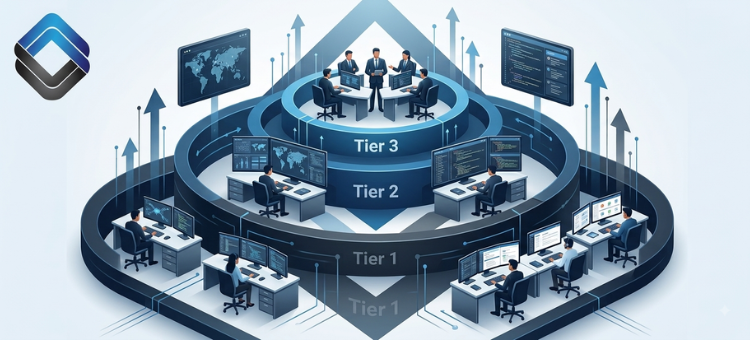
- Tier 1 handles repeatable issues and initial triage.
- Tier 2 investigates incidents requiring deeper technical knowledge.
- Tier 3 resolves problems involving advanced engineering, architecture, security, or product expertise.
The purpose is to establish a clear route from initial contact to final resolution without wasting specialist capacity.
What Is a Tiered Support Model?
A tiered support structure separates IT support responsibilities based on technical complexity, business impact, required permissions, and the expertise required to resolve an issue.
Most requests enter through Tier 1. The ticket moves to Tier 2 or Tier 3 only when documented escalation conditions are met.
Each tier has a defined scope, but all three levels function as a single support operation.
A typical structure looks like this:
- Tier 1: Ticket intake, classification, basic troubleshooting, known resolutions, and user communication
- Tier 2: Advanced diagnosis, configuration changes, system-level troubleshooting, and recurring-issue analysis
- Tier 3: Engineering-level investigation, root-cause analysis, permanent fixes, and advanced vendor coordination
Job titles shouldn’t define these tiers: the support level should reflect the work being performed.
Tier 1: Intake, Triage, and Routine Resolution
Tier 1 is the first point of contact for users. The team receives requests, records the correct information, assesses urgency, and applies approved troubleshooting steps.
A capable Tier 1 IT support function commonly handles:
- Password resets and account unlocks
- Standard access requests
- Email and collaboration-tool issues
- Basic software installation requests
- Printer and peripheral problems
- Common endpoint connectivity issues
- Initial VPN troubleshooting
- Ticket classification and prioritization
- User updates and closure confirmation
Tier 1 technicians need reliable documentation, visibility into supported systems, and enough authority to resolve routine requests. This is to prevent unnecessary escalations.
At the same time, they must also collect complete information when escalation is necessary.
A ticket stating that “the application isn’t working” gives Tier 2 very little to investigate. A useful ticket identifies the affected user, device, application, exact error, start time, business impact, troubleshooting completed, and available logs.
In our experience, Tier 1 should be defined by an approved resolution scope rather than a fixed troubleshooting time.
A technician shouldn’t spend 45 minutes investigating an issue that clearly requires administrative access. However, a known issue shouldn’t be escalated after a few minutes because the first step didn’t work.
Tier 2: Advanced Technical Troubleshooting
Tier 2 handles issues that can’t be resolved through standard Tier 1 procedures. These technicians usually have deeper knowledge of operating systems, networks, identity platforms, device management, and cloud services.
Common Tier 2 responsibilities include:
- Diagnosing recurring endpoint failures
- Investigating application and system logs
- Resolving advanced authentication problems
- Troubleshooting network, VPN, and remote-access issues
- Correcting approved configuration errors
- Managing administrative changes
- Investigating incidents affecting multiple users
- Coordinating with infrastructure and security teams
- Creating technical troubleshooting procedures
- Reviewing incorrectly routed tickets
Tier 2 shouldn’t become the default destination for every difficult request. Without clear boundaries, the team can quickly accumulate work that Tier 1 could resolve with better documentation or training.
Consider a business application that repeatedly loses access after a permissions update. Tier 2 may identify the configuration conflict and restore access. Closing the incident solves the immediate problem; documenting the symptoms, diagnostic steps, and resolution allows Tier 1 to recognize the same issue later.
Tier 3: Specialist Investigation and Permanent Resolution
Tier 3 represents the highest level of technical expertise within the support structure. Depending on the business, this tier may include senior infrastructure engineers, cloud architects, cybersecurity personnel, database administrators, or product engineers.
Tier 3 commonly handles:
- Product defects and code-level failures
- Complex infrastructure incidents
- Architecture and integration problems
- Persistent incidents with no known resolution
- Database corruption or major performance issues
- Serious security events
- Recurring failures requiring root-cause analysis
- High-risk technical changes
- Vendor cases requiring advanced evidence
- Permanent corrective actions
Tier 3 capacity is expensive. A well-designed tiered support model protects that capacity: it ensures Tier 3 specialists receive issues only when their expertise is necessary.
Suppose a customer-facing integration stops processing transactions. Tier 1 verifies the affected accounts, gathers error details, and checks for known outages. Tier 2 reviews authentication, configuration, connectivity, and available logs. If the findings indicate a software defect, Tier 3 examines the code or architecture and develops a permanent fix.
The escalation is justified because the technical requirement changes at each stage.
Why Growing Businesses Need Tiered Support
An informal support process often depends on personal relationships and individual memory. Users often know which technician understands a particular application, and urgent requests arrive through chat.
Furthermore, solutions may never enter the knowledge base.
That approach becomes risky as the business grows.
Specialist Time Gets Consumed by Routine Work
When all technicians receive all types of requests, senior employees spend time on basic issues while complex incidents wait.
Tiering preserves specialist time for problems requiring advanced knowledge.
Ticket Ownership Becomes Unclear
Unstructured escalation often involves blindly forwarding an email or changing an assignment. The user may receive conflicting updates or no update at all.
Defined tiers clarify who performs the technical work and who communicates with the user.
Support Quality Becomes Inconsistent
Without approved intake questions and troubleshooting procedures, two users reporting the same issue may receive different levels of service.
A tiered structure makes diagnosis, documentation, and communication more consistent.
Staffing Decisions Become More Accurate
Separating demand by tier reveals whether the organization requires more frontline technicians, advanced troubleshooters, or specialist access.
For instance, hiring a senior engineer won’t correct an overloaded Tier 1 queue, nor will adding entry-level analysts solve an infrastructure issue.
How to Build a Scalable Tiered Support Model
We recommend first understanding the demand for support and then building the structure around it.
1. Analyze Current Ticket Demand
Review several months of ticket information where possible.
Group requests by:
- Service or application
- Request category
- Priority and business impact
- Resolution method
- Assigned technician
- Required permissions
- Number of reassignments
- Resolution time
- Reopened status
Look beyond ticket volume, as a high transfer rate may indicate weak routing rules.
Repeated escalation of the same issue may show that Tier 1 needs better documentation. Similarly, growing after-hours backlog may reveal a coverage problem rather than a staffing shortage.
If the available records are incomplete, review shared inboxes, support chats, call logs, and technician notes. Distinguish routine work from advanced and specialist demand.
2. Create a Service Catalog
A service catalog identifies what the support team handles and who owns each service.
It should list:
- The supported service
- Available request types
- Responsible support tier
- Expected response target
- Required approvals
- Escalation destination
- Applicable support hours
Typical categories include identity and access, end-user devices, collaboration tools, business applications, network connectivity, and cloud infrastructure.
3. Define Each Tier’s Scope
Create a resolution matrix connecting common issues to the appropriate tier.
For each ticket category, specify:
- What Tier 1 can diagnose and resolve?
- What requires Tier 2 access or expertise?
- What requires Tier 3 involvement?
- What conditions require immediate escalation?
- What evidence must accompany the escalation?
- Who remains responsible for user communication?
Avoid broad directions such as “escalate complex issues.” They are vague and don’t help a technician make a decision under pressure.
A clearer documentation would be: “Escalate VPN incidents to Tier 2 after completing the documented connectivity and credential checks.”
4. Separate Priority From Complexity
A technically difficult issue isn’t automatically urgent. Likewise, a technically simple issue may have an immediate business impact.
We recommend assessing tickets using two operational factors:
- Impact: How many users, customers, locations, or business processes are affected?
- Urgency: How quickly will the effects become serious?
Priority should determine response targets and update frequency, while technical complexity should determine the tier.
5. Establish Clear Escalation Triggers
An effective support escalation process relies on objective criteria rather than individual judgment.
Common triggers include:
- Approved troubleshooting steps have been completed without resolution
- The required action exceeds the technician’s access rights
- The incident affects multiple users or a critical service
- The evidence suggests a security event
- The ticket is approaching an SLA threshold
- The incident has reopened repeatedly
- A product specialist or external vendor must become involved
- The incident creates legal, regulatory, operational, or reputational risk
The UK National Cyber Security Centre recommends defining incident roles, responsibilities, decision authority, contact details, and escalation criteria in advance. Although the guidance focuses on cybersecurity incidents, the underlying principle applies to any high-impact IT event.
6. Standardize the Escalation Package
Poor escalation forces the receiving technician to repeat the initial investigation.
Every escalated ticket should include:
- User and contact details
- Affected device, application, or service
- Exact symptoms and error messages
- Business impact and assigned priority
- Number of affected users
- Issue start time
- Screenshots, logs, and diagnostic results
- Troubleshooting already completed
- Outcome of each action
- Relevant recent changes
- Requested action from the receiving tier
- Time of the next promised user update
The receiving tier should accept or reject the ticket within a defined period. The rejection should include a specific reason, such as missing diagnostics or incorrect routing.
7. Build a Knowledge Transfer Loop
Information must move in both directions: Tier 1 sends complete diagnostic details upward, while Tier 2 and Tier 3 send repeatable resolutions downward.
After resolving an escalated incident, ask:
- Is this issue likely to occur again?
- Can Tier 1 resolve it safely?
- What permissions are required?
- What symptoms distinguish it from similar issues?
The 2026 State of Tech Talent Report found that 94% of surveyed organizations consider upskilling existing employees important for closing talent gaps, while preserving institutional knowledge.
For a tiered support operation, that means documenting repeatable solutions, cross-training team members, and gradually expanding Tier 1 capabilities.
Each knowledge article should include an owner, a review date, a service category, prerequisites, resolution steps, a validation procedure, and an escalation condition.
Metrics That Show Whether the Model Works
A tiered support model should be measured as one service. Evaluating each queue separately can encourage teams to move tickets quickly without improving the user’s overall resolution experience.
First-Contact Resolution
This measures the percentage of eligible tickets resolved during the initial interaction. An improving rate may show that Tier 1 knowledge and capability are increasing.
Escalation Rate by Category
This reveals which request types regularly move between tiers. High escalation may be appropriate for defects and security incidents.
But repeated escalation of routine issues may indicate missing documentation or even insufficient permissions.
Reassignment Rate
Multiple transfers suggest inaccurate categorization, unclear ownership, or poorly designed queues.
Time to Escalate
This measures how long a ticket remains at one level before reaching the required specialist. Excessive time may indicate that technicians are retaining issues beyond their capability.
Reopen Rate
Reopened tickets may indicate an incomplete diagnosis, premature closure, inadequate user instructions, or unsuccessful validation.
SLA Compliance and Backlog Age
Track response, update, and resolution commitments separately. Also divide open tickets into age ranges.
Even a manageable ticket count can hide several long-running incidents.
User Satisfaction
Connect satisfaction results to ticket category, resolution tier, response time, and number of transfers.
This context helps identify whether dissatisfaction comes from the resolution, the delay, or poor communication.
Build the Structure Before Ticket Volume Forces It
A scalable support operation doesn’t require every technician to understand every system.
Instead, it requires clear ownership, accurate triage, controlled escalation, reliable documentation, and consistent knowledge transfer.
A properly implemented tiered support model gives Tier 1 the resources to resolve repeatable requests. It also sends advanced incidents to Tier 2, and protects Tier 3 capacity for work requiring specialist expertise. Also, business leaders get better information about staffing, coverage, service risk, and recurring technical problems.
The goal is to make every escalation informed and accountable.
Request a custom quote from 31West to build a support plan around your users, applications, ticket volume, service hours, and growth priorities.


