

Gone are the days when people would wait for a business to open to send their messages or call the company.
Today, when a customer wants something, whether it’s a simple question or a technical concern, they won’t look at the clock before calling you. They expect an immediate response. In fact, research by HubSpot shows that 67% of customers expect a company to resolve their tickets within three hours of raising them.
This shows the significance of customer support beyond a business’s operating hours. We’ve just listed one stat that shows the growing demand for instant business response. When your customers do not get immediate replies or their concerns aren’t addressed promptly, they will find it easier to switch to your competitors.
You may wonder how businesses manage to offer after-hours and even 24-hour customer support without burning out their teams. It may be particularly difficult for small-scale organizations with fewer employees and a limited budget to have a full-fledged, round-the-clock customer support operation.
Having a night-shift staff, managing shift rotations, and ensuring consistent support quality can add more pressure to an already exhausted team. Skipping after-hours support isn’t a solution either.
If you are stuck with the same concerns, this post is for you. We’ve listed practical strategies for deploying after-hours customer support that can help all sizes of businesses, including startups, small-scale, and large-scale organizations, without burdening your team.
Practical Tips for Providing Customer Support Outside Business Hours
If you receive customer queries outside your normal operating hours, these tips can help you build a team that can efficiently cater to this after-hours customer demand without putting pressure on your in-house team.
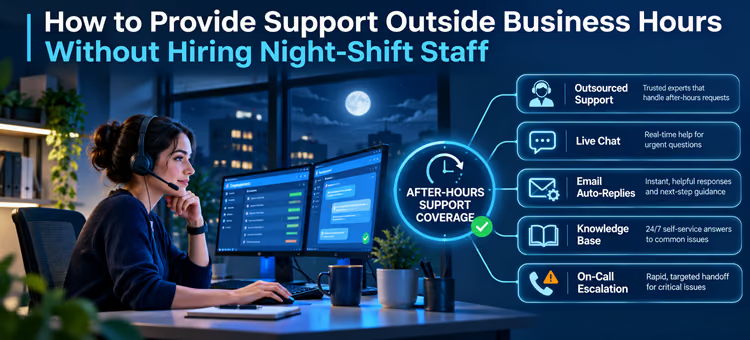
Hire Third-Party Service Providers for Nighttime Customer Support
A BPO company can handle customers’ calls and messages at night. They can provide answers to their questions, help with navigation, troubleshooting, and other concerns by using your provided resources. The best part is it’s the easiest and one of the most affordable customer support options.
Having a dedicated nighttime service that answers most of your customers’ questions won’t just help your customers, but also your internal team, by reducing the number of repeated simple questions.
These agents can use the help centers or knowledge base to find answers to common, repetitive questions. You only need to create a detailed knowledge base, organize everything into clear categories, and make your site easy to navigate.
Another benefit is that you may not need to add more agents to the internal team.
For example, if you run an eCommerce store, your nighttime staff can learn about different aspects of shopping at your store. This may include memorizing the steps to exchange a product, return it, track the order status, or understand the refund policy. For a software company, the nighttime support staff can explain how to set up an account, configure the software with their existing ERP solutions, manage subscriptions, pay fees, or update software.
Outsource After-Hours Support
If you occasionally handle late-night customer interactions or receive few queries on weekends or outside business hours, building a night-shift support operation may not be practical.
Instead of creating your own customer support team for the night shift, you can outsource after-hours support to a call center or help desk company, such as 31 West Global Services. Your in-house team can handle daytime customer interactions, while the external team can handle customer queries at night. This way, your business will remain open after your operating hours, and your internal team won’t be overwhelmed by the increasing workload.
Based on your requirements, you may get coverage for specific hours outside your normal business hours, weekends, or public holidays. For example, a financial company can outsource its after-hours customer support to a third-party help desk company, while its internal team handles the complex troubleshooting problems.
The biggest perk is the flexibility. You don’t have to find, recruit, and train a new team. Instead, you pay for the capacity used and get a qualified team that’s already trained to work with customers. It’s also easier to explain your business protocols to a professional call center company, explain how you work, and set up an escalation system.
It’s mainly beneficial for companies that do not want to use their internal teams to work night shifts or have the time and budget to build a new team for support operations.
Since the help desk company will represent your brand, it’s important that you choose the right company. Here are a few things you must look for when hiring an after-hours help desk service:
- Response-time commitments
- Agents’ qualifications
- Data security practices
- Training processes
- Escalation rules
- Reporting capabilities
When working with an outsourced customer support company, you must establish clear escalation rules. While the external team may address simple customer questions or help with basic troubleshooting, they may not be authorized to handle complex or sensitive issues.
This requires a clear escalation process. The unanswered or unresolved concerns are passed on to either on-call employees (for urgent issues) or to the internal team through ticketing systems.
Have an On-Call System for Emergency
Not every business can afford to create a night shift for customer support, but not every company can overlook their customer concerns either.
For a general eCommerce business, this may not seem concerning, but for a SaaS company, a financial institution, a bank, a cybersecurity service provider, and other industries that work with sensitive data, having a support solution that serves customers 24/7 is necessary.
If you can’t have a separate team for overnight customer support, you can have an on-call system for emergency issues. You can have one or two employees who handle urgent requests at midnight.
For example, a customer experiencing a security concern can connect to the on-call expert at any hour, or a software company’s client who experienced a service outage might reach out to these employees.
An on-call expert is different from your regular customer support team. They won’t handle routine customer questions or individual concerns unless the issue is big enough to affect your company’s reputation, security, or operations.
For example, for an eCommerce company, a system failure that affects the entire business operations and all its customers can be classified as an emergency, while a single customer inquiring about their order status can wait until the next morning.
An on-call system doesn’t completely eliminate the night shift but limits it to urgent issues. Here are some tips for setting it up perfectly so that you can leverage the service without exhausting your employees.
- Set clear escalation rules.
- Define emergency services clearly.
- Have an automated monitoring system that notifies the on-call expert when a certain threshold is crossed.
- Move to a more formal and comprehensive nighttime coverage if you receive multiple calls, messages, or emails, most of which meet the emergency criteria.
Remember, the purpose is not to go staff-free, but to use your night shift employees for urgent issues only.
Use Email Responses
Email is still one of the effective communication tools for clients and businesses. Your customers can drop an email explaining the concern they have at any hour, and your team can respond during your working hours.
The only gap you need to fill here is the acknowledgement receipt. Silence after an email is delivered may seem confusing. Your customers might wonder whether the email was received and when they can expect a reply. That’s where an email response can help.
When a customer sends an email, they must get an immediate response that says you have received their email. The message must also mention when they should expect a reply from the team and assign a ticket number. Additionally, it can redirect them to your company’s knowledge base page.
Integrate Live Chat Support
For customers who aren’t comfortable calling your team or waiting for an email response, live chat support can serve as the perfect middle ground. It can be used for urgent, complex, or technical issues that require real-time human support.
However, you don’t need to hire staff for live chat support overnight. Many businesses configure the system to work differently during operating and non-operating hours.
For example, when a customer contacts your team during business hours, they can connect to a live chat agent. If they use the chat widget after your business is closed, their message could be recorded, or they can be redirected to the knowledge base.
For example, a customer contacting your business after 11 PM can receive an automated message that reads, “We are unavailable right now, but you can visit our help center or leave a message. We will respond to it within the next 12-15 hours.”
Final Words
Customer support outside your business hours isn’t a trend anymore. It’s become an integral part of a business strategy, no matter the size and nature of the business. So, why wait? Use outsourcing, live chats, emails, and shift rotations to get full coverage without overburdening your employees.
For further reading, see “when does hiring an outsourcing team makes sense.”
Frequently Asked Questions
When should you rotate schedules?
If you have an internal team working night shifts, it makes sense to rotate the schedules so they don’t become exhausted or feel overburdened.
Which is better: an in-house team or an outsourced service for 24/7 coverage?
Combining the two can be a more efficient and affordable strategy. You can have the internal team work during the business’s operating hours, while outsourcing nighttime support to a third-party service provider.
Are chatbots efficient for customer support?
It depends on the nature of your business and your customers’ demand. Having a chatbot for simple queries or navigation might be a smart decision, but using chatbots alone for customer support isn’t an effective long-term support strategy.
Do I need after-hours coverage for my local business?
Yes, you do. Customers can send inquiries at any time, no matter where they are based. The more important question is: do you expect customer calls after business hours? If yes, it makes sense to have after-hours customer support regardless of where your audience is based.
How can I measure the success of my outsourced after-hours support team?
You can use metrics such as First Response Time, Customer Satisfaction Score, Escalation Rate, and Customer Churn to measure the performance of your customer support team.
Can you use your internal team for nighttime customer support?
It's possible, but highly discouraged. This can put an excessive burden on your team that’s already working a day shift.
Why should you have a self-service knowledge base?
Many of the questions your agents get on a regular basis can be easily found on a self-service knowledge base portal. So, instead of leaving everything to your agents, have a dedicated and comprehensive knowledge base that answers the basic customer questions and helps them with navigation.
What coverage do you need from third-party customer support service providers?
The coverage requirements can greatly vary from one business to another, and depend on when you receive most of your customer inquiries. Notice trends and interaction patterns to know when your customers call or message you. For example, if you receive most inquiries between 6 PM and 9 PM, that’s the coverage you need.
Why do you need after-hours support?
Because customers can contact you at any time. If they don’t get an acknowledgement receipt or a response from your team, they may move to your competitors, resulting in lost customers, sales, and revenue.
Why shouldn’t you use chatbots for customer support?
The downside is that AI chatbots can’t reliably answer all customer queries or troubleshoot all concerns efficiently. Besides, not every customer may like talking to a chatbot. Many customers expect a human response and would rather wait for the agent to be available than seek the bot’s assistance.